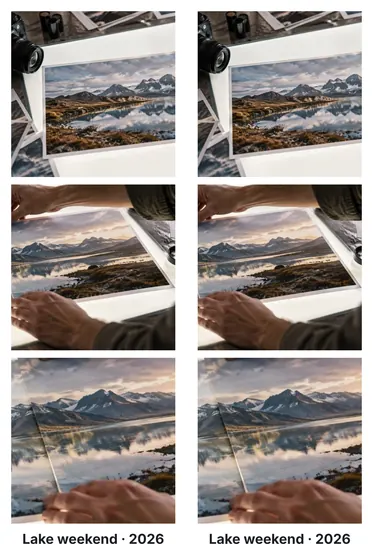
A booth strip is a frame measured in inches
A photo strip is a fixed frame: 2 inches by 6, which at 300 dots per inch is 600 by 1,800 pixels. The pictures do not decide its size — they share it, each in an equal cell, cropped to fill, with a band at the bottom for a caption. Because the size is fixed, the DPI written into the file is honest: print it at 300 DPI and it comes out at 2 × 6.
Making a strip
- Add three or four photosTop to bottom in tray order; drag in the tray to reorder.
- Choose what each cell keepsDrag inside a cell, or select it and use the arrow keys.
- Add a captionType it under Caption band — it takes a band at the bottom.
- Export the strip or a print sheetExport for the 2 × 6 file; Print sheet for two strips on a 4 × 6.
Where it stops
There are no booth frames, stickers, filters or countdown camera here — just your photos, laid out exactly. The strip is 2 × 6 at 300 DPI; for another size, open the two-photos-in-one-frame page and set the frame.
Questions people ask
What size is a photo strip?
The classic booth strip is 2 × 6 inches. At 300 DPI that is 600 × 1,800 pixels, which is what this page makes, with 300 DPI written into JPG and PNG files so a print shop prints it at 2 × 6.
How many photos go on a strip?
Three or four look like a booth strip. The strip divides itself among however many pictures are on the board, top to bottom in tray order.
Can I add a caption at the bottom?
Yes. Type it under Caption band — a name, a date, an event — and it gets its own band at the bottom of the strip; the photos share the rest.
How do I print two strips at once?
Under More ways to save, Print sheet puts two copies side by side on a 4 × 6 inch sheet (1,200 × 1,800 px at 300 DPI) — the common photo-print size. Cut it down the middle.
Will my photos be cropped?
Each cell is filled, so a photo that is not the cell's shape is cropped; the inspector says how much each loses, and you drag inside a cell to choose what stays. Switch to Show all under Cells to keep every photo whole.
Are my photos uploaded?
No. The strip is laid out and written in this tab.